Wednesday, November 27, 2013

What's new in EJBCA 6 part 4: Enterprise and Community

Welcome to the fourth part of the series about what is new in the upcoming EJBCA 6.

For the first part in the series, read Part 1: Crypto Tokens in GUI.
For the second part in the series, read Part 2: CMP aliases and GUI configuration.
For the third part in the series, read Part 3: Internal Key Bindings.

In part 4 we will dig into the concepts of EJBCA Enterprise and Community. The separation was started with the Common Criteria certification of EJBCA 5, and is now completely harmonized with EJBCA 6. EJBCA Enterprise brings additional value to organizations that subscribe to support services, this blog post will tell you what, and why.

The freshest, most up to date, description of EJBCA Enterprise will be available at PrimeKey.

Open Source Enterprise Editions

Enterprise editions is a common way for open source projects and companies to offer additional value to organizations that subscribe to support services, and hence indirectly pay the bills for the developers of the software.
Not a completely unproblematic issue since part of the soul of Open Source is that you can freely download and use the software. So why choose the Enterprise edition? Here is the reasoning:
  • The requirements on professional enterprise software are very high nowadays and the users demand high quality, lots of features, software certifications etc. There is simply need for a lot of full time staff to develop and support an enterprise scale software today. Income is needed to pay salaries.
  • The Community is one of the founding pillars of Open Source software, the community has made us what we are. The community needs a comfortable way to use, interact and to contribute to the future of the project.
To keep up that pace of development, and support, there is of course a need for constant business. What we need, as a company, is to provide added value so that you find that you get great benefit from the money. This is where the Enterprise edition comes in.

There are many very appreciated organizations in the world, that subscribes to support. 
Thank you, you know who you are!

There are many appreciated community members, thank you as well! 

EJBCA Enterprise

PrimeKey, with EJBCA, started out with an Enterprise edition as of EJBCA 5, where PrimeKey, together with partners, made a huge investment to make the software Common Criteria certified.

We have written a little bit about this before in two previous (older) blog posts:
With EJBCA 6 we want to finalize and harmonize the concept and versions.

The idea behind EJBCA Enterprise is simply:
  • Provide organizations with the best, most hassle free, sleep good at night, PKI experience money can buy - with EJBCA Enterprise
  • Allow do it yourselfers (DIY), who are confident they can roll their own, to use the best PKI product they can find - with EJBCA Community
  • All this with Open Source!
 A little more in detail, the strategy is:
  • To focus the enterprise additions on the main target markets where we compete with proprietary software and can provide support services to organization that are prepared to pay for these services. Providing the best PKI services from the most experienced staff, with add-ons that makes their PKI the most efficient and cost-effective PKI on the market.
  • Enabling the Open Source Community with the best PKI product on the market with full features, allowing everyone to contribute directly to the latest version of the project in a simple way, with full access to the source code.

PrimeKey EJBCA Enterprise features and services

The freshest, most up to date, description of EJBCA Enterprise will be available at PrimeKey.
This is a snapshot at the time this blog post was written.

These are the main value adding features and services that will be available only with EJBCA Enterprise:
  • Professional support with different SLAs and private support portal access.
  • Additional development services.
  • Training courses.
  • Bug, security and hot fixes.
  • Additional integration guides and supported integration with 3rd part products (for example token management).
  • Common Criteria certification with specific features:
    • Database integrity protection.
    • Secure audit logging (log signing).
  • High Availability setups with redundant clusters and disaster recovery.
  • EAC ePassport PKI, with BAC, EAC, SPOC, PKD etc.
  • GOST and DSTU algorithms.
  • 3GPP/LTE CMP support.
  • Add-on tools:
    • Database CLI for migration between databases, verification of integrity protection etc.
    • Tools for speeding up deployments across environments.
    • Validation tool for conformance checking of certificates and OCSP responders.
  • Upgrade assistance, also from very old versions of EJBCA Community to the latest EJBCA Enterprise.
  • Last but not least, soon to be available in a plug and play PKI Appliance.

Find out more

If you are using EJBCA Community, and are interested in EJBCA Enterprise, or if you just want to know more. Don't hesitate to contact me at tomas@primekey.se. Migrations from Community to Enterprise is of course trouble free and we can help you every step of the way.

If you are interested in getting to know the different subscription options, contact sales@primekey.se, we are flexible.

Check in with PrimeKey, or follow us on Twitter, for the latest news and events.

Another interesting blog post on Open Source and Enterprises is Feed the Fish, from the people behind TomEE.

The Team

The great team that, with pride, brings you EJBCA, Signserver, PKI Appliance, SPOC and everything around it is:

Joonas, Mike, Marcus, Markus, Johan, Aveen, Samuel, Lars, Konstantin, Admir, Anna, Björn, Anna, Tomas, Lars, Maikel, Marko, Raoul, Joakim, Branko, Dimitrios, Tham, Manuel, Roland, Martin.


Questions and answers

Here are some questions asked by people reading the above:

Q1. Do the improvements in EJBCA Enterprise ever find their way to Community.

Answer: As I tried to state above, EJBCA Enterprise does not contain improvements of Community features. It contains specific features used for specific Enterprise use cases. These features are planned to remain Enterprise features until the concept changes (if it changes).
Improvements to common functionality will be released in both Enterprise and Community. The times will only be constrained by release schedules. Enterprise is expected to have more releases than Community.

Q2. Is it possible to migrate from EJBCA Enterprise back to community? If so, what is the difficulty.

Answer: Yes that is possible. Naturally you will loose the Enterprise functionality such as audit log signing. The CA will continue to work, just without this feature.

Q3. When someone licenses EJBCA Enterprise, if they do not wish to maintain support contract do they have to downgrade when the support contract ends.

Answer: No. Naturally they will however no longer get upgrades from PrimeKey.

Q4. Do improvements in Community ever find their way back into Enterprise? If yes, how long does that take.

Answer: Yes, this will be included in following releases.

Q5. When will EJBCA Community version 6 be released?

Answer: We are currently working on the distinction between Enterprise and Community as described above. There is no fixed date, since this depends on developer resource availability. It will not be too long, don't despair.

Tuesday, November 19, 2013

OpenSSL commands every PKI expert should know

Let's face it, OpenSSL is the number one toolkit for any PKI expert when it comes to dissecting and manipulating files such as CSRs, certificates, PKCS#12 keystores, asymmetric keys etc. We use it all the time when developing EJBCA, Open Source PKI.

Using openssl is not always the easiest task in the world, but there are a number of commands that I find myself using over and over again. So much that I can almost type them in my sleep.

Parsing certificates

Reading X.509 certificates in PEM format:
openssl x509 -in cert.pem -text

Reading X.509 certificates in DER format:
openssl x509 -inform DER -in cert.der -text

Converting X.509 certificates from DER to PEM:
openssl x509 -inform DER -in cert.der -outform PEM -out cert.pem

You can also add parameters to only output specific fields, like certificate serial number, public key etc. I rarely use those though, I just dump the cert and look at the whole thing.

Parsing certificate signing requests (CSRs)

Reading a CSR in PEM format:
openssl req -in req.pem -text

Reading a CSR in DER format:
openssl req -inform DER -in req.pem -text

Converting a CSR from DER to PEM:
openssl req -inform DER -in req.der -outform PEM -out req.pem

Parsing pure ASN.1

Sometimes you really want to see the nitty gritty details of a certificate or CSR, to find out what encoding is used in the DN, how the extensions look, what order fields actually are in the file etc.

openssl asn1parse -in cert.pem

add the dump parameter to dump the (unknown) contents of sequences:
openssl asn1parse -in cert.pem -dump

Generating certificate signing requests (CSRs)

To generate a new key pair and a certificate request, for example for getting a certificate for an apache server:
openssl req -out csr.csr -new -newkey rsa:2048 -nodes -keyout private.key

Check the private key:
openssl rsa -in cesecore2013.key -check

When generating CSRs you can add a lot of options to put in the CSR, like Subject Alternative names, certificate purposes, OCSP URLs etc. When creating CSRs to be sent to a CA this is normally not needed. The CA will populate all the fields for you, and normally ignore any additional fields that you specify (a real CA have no reason to trust arbitrary input from you). If you are generating your own self-signed certificates however, this may be of interest. 
Kevin McArthur has written a nice blog post how to work with OpenSSL to create certificates and CSRs. It's a bit outdated, but Kevin may update it.

Parsing PKCS#12 keystores

Reading a PKCS#12 file, giving output with encrypted private key in PEM format:
openssl pkcs12 -in superadmin.p12

Reading a PKCS#12 file, output with unencrypted private key:
openssl pkcs12 -in superadmin.p12 -nodes

The following commands are useful for splitting a PKCS#12 file up into PEM components (for example for an apache server or for manual sign/verify operations):

Reading a PKCS#12 file, outputing only the certificate to a file:
openssl pkcs12 -in server.p12 -nodes -nokeys -clcerts -out server.pem

Reading a PKCS#12 file, outputing only the private key to a file:
openssl pkcs12 -in server.p12 -nodes -nocerts -out server.priv

Reading the cert, extracting the public key in RSA format:
openssl x509 -in server.pem -pubkey -noout > server.pub

Signing and verifying large files

Signing of large files are done by making a digest (hash) of the file and then signing the hash:
openssl dgst -sign superadmin.key -sha1 file.txt > file.txt.sign

Verification of a file is done by verifying the signed hash (extracting the original hash) and comparing that to a newly calculated hash of the file:
openssl dgst -verify superadmin.pubkey -signature file.txt.sign -sha1 file.txt

See also Code signing over in the EJBCA Admin Guide.

Cmpforopenssl

I have previously written about cmpforopenssl. This is a great tool for using the CMP protocol.
You can read more about cmpforopenssl and EJBCA in the EJBCA Admin Guide.

OCSP

A popular openssl command for me is the OCSP request command. I use this to test OCSP responders all the time:

openssl ocsp -issuer Test-CA.pem -CAfile Test-CA.pem -cert Test.pem -req_text -url http://localhost:8080/ejbca/publicweb/status/ocsp


The tricky thing here is if you have an external OCSP responder, i.e. not requesting directly from the CA, then you must have the right combination of -CAfile and chain commands in order for the verification to succeed without having openssl claim that issuer is not trusted. The above command is perfect if you are requesting directly from the CA...

TLS client

You can test TLS/SSL servers using OpenSSL's s_client command. This is great for debugging TLS connections. It will show you the certificates used by the server and the accepted CA certificates sent by the server when asking for client certificate authentication. It can also be used to see the cipher suites negotiated.
openssl s_client -debug -msg -connect servername:443 > debug-log.txt < /dev/null

Converting between JKS and PKCS#12 (not using openssl)

Another old popular blog post I wrote was about converting between JKS and P12 using simple java commands, keytool.

Remove MS CSP information from a PKCS12/PFX

George L wrote an interesting comment on LinkedIn.
It's about MS adding CSP information when exporting a PKCS12 files, and this can cause errors when importing it into other versions of Windows. He provided a cool script that removes this information, using openssl.

----------------- removeCSP.bat --------------
@echo off
rem make sure you've got openssl and grep either in your path or in the same directory as the batch file
set /p pass=Please enter keystore password:
cd /d "%~dp0"
openssl pkcs12 -in "%~f1" -nodes -passin pass:"%pass%" | grep -v Microsoft | openssl pkcs12 -export -out "%~f1".new.pfx -passout pass:"%pass%"
echo Conversion complete.
pause
------------------ removeCSP.bat --------------

Friday, November 8, 2013

EJBCA 5.0.11 Released

EJBCA 5.0.11 released

8 Nov 2013 — Stockholm, Sweden

The PrimeKey EJBCA team is happy to announce that EJBCA 5.0.11 has been released! This is a maintenance release – 17 issues have been resolved. The most noteworthy changes can be seen below.

EJBCA PKI *5.0.11* release notes

A maintenance release containing a couple of small features and many bug fixes. The following are a selection of the most noteworthy:
  • New features

    • Support for multiple Vendor CAs in CMP for 3GPP/LTE networks.
    • Possibility to use token label to reference PKCS#11 slots.
  • Improvements

    • Support ECDSA for automatic key renewal in OCSP responder.
    • New WS keyrecovery method for specified certificates.
    • Add hostname in startup log.
    • Add configuration option for forbidden characters.
Development continues beyond this version and all requests from the community are scheduled for EJBCA 5.0.12 or later releases.
More information is available at the project web site and the complete changelog can be viewed in the issue tracker.

Thursday, October 10, 2013

What's new in EJBCA 6 part 3: Internal Key Bindings

Welcome to the third part of the series about what is new in the upcoming EJBCA 6.
For the first part in the series, read Part 1: Crypto Tokens in GUI.
For the second part in the series, read Part 2: CMP aliases and GUI configuration.

In part 3 we take a look at a major new function in EJBCA 6 called Internal Key Bindings. This is a framework function, with two current applications, and can be used for more things in the future.
An Internal Key Binding can be used to make keys in a Crypto Token available for other uses than in a CA. It consists of a reference to a key pair available to the EJBCA instance, a non-CA certificate, an optional list of trusted certificates and properties for its purpose. It can be thought of as a simplified key store with purpose-specific properties.

So what can we do with internal key bindings?

The first thing is to introduce OCSP (RFC6960) Key Bindings. An OCSP Key Binding can be used to sign OCSP responses on behalf of a CA. It has a key in a Crypto Token and an OCSP signing certificate. Additionally a list of trusted certificates can be used to verify that OCSP requests are sent from a trusted source and additional properties can be used to specify how long an OCSP response should be valid etc.

What does this provide us that we could not do before?

Well for example:
  • Cluster wide OCSP responder key configuration. Configure on one node, and all nodes sharing the same database will be configured.
  • Full GUI support for configuration of OCSP responder keys and certificates. This is a function of the standard Admin GUI.
  • Support for multiple Crypto Tokens in an OCSP responder. The old configuration file only supported one PKCS#11 slot.
  • No need to load OCSP signing certificates into the HSM, signing certificate is read from the database.
  • Full control of you OCSP signers.
  • Mix delegated OCSP signers with direct CA signers, CAs and delegated OCSP responders can reside in the same instance. 
(See screenshots in the end)

What more can we do?

Authentication Key Bindings is a key binding used as identity in outgoing TLS connections, i.e. TLS client certificates. This can be used to authenticate an OCSP responder's web service calls when using web services to automatically renew certificates from a CA.

 On top of this it is possible to create new types of key bindings as we figure out new cool things. Anything that makes use of a key pair and a certificate gains the full maintenance options and HSM support of Internal Key Bindings.

Naturally there are a bunch of general maintenance options available for all Internal Key Bindings.

  • Enable/Disable: Marks the Internal Key Binding as Active/Disabled. Only Active ones will be used and processed by healthcheck.
  • Delete: Removes the Internal Key Binding, but will not remove the referenced key pair or certificates.
  • New keys: Generates a new key pair in the referenced Crypto Token using the same key specification as the current key has and an alias derived from the current alias.
  • CSR: Creates a Certificate Signing Request using the next key pair (or current key pair when no next key pair exists).
  • Update: Searches the database for the latest issued matching certificate for the next key pair (or current key pair when no next key pair exists) by using SubjectKeyId.
  • Renew: When the CA that issued the current certificate is active and resides in the same instance, this will create a new certificate using the same End Entity as the last one was issued with. If a next key pair exists, that key pair will be used.

Part 4 of "What's new in EJBCA 6" will be about Community vs Enterprise edition and how you, with EJBCA 6, will be able to actively participate in the development community.

Until then...check in with PrimeKey, or follow us on Twitter, for the latest news and events.


Pic 1: List of Key Bindings. There are tabs for different types of Key Bindings.

Pic 2: Editing an OCSP Key Binding.

Friday, September 20, 2013

SignServer 3.4.2 released

The PrimeKey SignServer team is happy to announce that SignServer 3.4.2has been released!
This is a maintenance release with in total 13 tickets resolved.

The most noteworthy changes can be seen below. Development continues beyond this version and all requests from the community are scheduled for SignServer 3.4.3 or later releases. More information is available at the project web site and the complete changelog can be viewed in the issue tracker.

Major new features and improvements:
  • Uses PKCS#11 crypto token implementation from the Common Criteria certified CESeCore
  • Support for starting audit log verification from a specified sequence number
  • Option to archive all X-Forwarded-For addresses
  • Option to include the ordering field in time-stamp tokens even if the
  • field has value false
  • Option to not include the signingTime CMS attribute in time-stamp signer
  • Option to cache PKCS#11 key reference to increase performance
  • Includes IssuerSerial in the SigningCertificate attribute in
  • time-stamp signer
Bug fixes:
  • HSM auto activation was not working when signed audit log were used
  • Key generation was not working with slotListIndex
  • ClientCLI over web services was not working unless includemodulesinbuild was specified 
Regards,
The PrimeKey SignServer team

Wednesday, September 18, 2013

Certificate Transparency and PreCertificates, how will that work?

The Certificate Transparency initiative (RFC6962) is an admirable suggestion to improve security of TLS web session for certificates issued by public CAs. It has cool technology with Merkle trees, is admirable short and could have been straight forward was it not for something called PreCertificates. PreCertificates are hard for me to understand, I don't like them. I hope it is because I don't understand them...if so please let me know.

Writing this post is a way to sort things out for myself and I'd be happy to edit this post if explained why I "just don't get it". Of course I am posting this to the CT forum as well...

In the sake of transparency, I'm writing with the view point of an implementer of open source CA software (if you didn't figure that one out from the blog name:-)).

Update 1: I got lots of comments already over at the Certificate Transparency Forum, really good.

Update 2: I created an issue in the Certificate Transparency issue tracker. https://code.google.com/p/certificate-transparency/issues/detail?id=18

Update 3: Of course my views on CT changes as the discussion continues, the post below was my original starting point. Follow the discussion in Update 1 for updates.

Update 4: EJBCA will support Certificate Transparency in EJBCA Enterprise eventually, watch out for news.

On to PreCertificates...

PreCertificates are defined in section "3.1. Log Entries" as (text trimed by me) "The Precertificate is constructed from the certificate to be issued by adding a special critical poison extension to the end-entity TBSCertificate". Then it describes how it can be produced and it is mentioned throughout the spec in many places.
A PreCertificate is a essentially a certificate signed with one of two options:

1. PreCertificates signed by the real CA.
This sounds very dangerous as will break the fundamental X.509 rule of unique issuerDN/serialNumber pairs. The consequences of having two "certificates" with the same issuerDN/serialNumber in the wild can not possibly be estimated, making this practice quite dangerous imho.

2. PreCertificates signed by a separate PreCertificate signing CA, which is a SubCA to the real signing CA. This is a less scary, since it is normal practice that different CAs can issue certificate with the same subjectDN/serialNumber, just not the same issuerDN.

The actual implementation of issuing PreCertificates makes it quite impractical. I would believe that most CA implementations creates the TBSCertificate as part of the actual certificate issuance. The CA will not create the TBSCertificate to have is lying around for a couple of days before using it to issue the real certificate.
Thus, if the CA is to create a PreCertificate to send to the CT log, it might as well issue the real certificate and send it to the log. The time difference should be in the milliseconds for most CAs.
If the CA wants to wait before distributing the real certificate, to make sure it's in the logs before put into production, it can surely do so as well.

The PreCertificate imho suffers from several complicating factors for implementers, both on the CA and the CT log side. The TBSCertificate must have a poison extension inserted, and removed, effectively re-encoding the ASN.1 TBSCertificate several times, all these are points of failure.

The reason for PreCertificates are not clearly explained. Why would you want to use PreCertificates?

Fine combing through the spec gives me some ideas on why, for example to be able to embed the Certificate extension from PreCertificate CT logs in the final certificate (section 3.3). But the the TBSCertificate of the PreCertificate is then no longer the real TBSCertificate? In that case, why is the PreCertificate the TBSCertificate at all, and not just a new data structure with the data the CT log wants?

The PreCertificate complicates the CT spec by orders of magnitude, which is not a good thing. There are so many ifs and buts about PreCertificate the RFC is not even itself consitent about what it is.

Ok, I know the PreCertificate is is optional, but the best standards, who gets fast, wide and robust deployment, are the simpler ones (KISS). Skipping PreCertificates from the CT spec makes it so much simpler.

My suggestion:
- Skip PreCertificates altogether

I see though why people will not accept that just because I say something...so in that case

- Explain the purpose behind PreCertificates well
- Describe what the actual information fro PreCertificate are used
- Be consistent throughout in the RFC

Feel free to contact me at tomas a t primekey dot se.

Thursday, September 5, 2013

What's new in EJBCA 6. Part 2: CMP aliases and GUI configuration

Welcome to the second part of the series about what is new in the upcoming EJBCA 6.
For the first part in the series, read Part 1: Crypto Tokens in GUI.

In part 2 we will take a look at new major features in the EJBCA support for the CMP protocol, RFC4210.
EJBCA has supported RFC4210 all the way since EJBCA 3.4 in 2005.
(for the history inclined, see ECA-99).

CMP is a very complex protocol with literally hundreds of different options. And those are just the options that are specified in the RFC, then there is also the question how to process them in the back-end with different types of authorization, auto enrollment, support for both end clients and RAs etc etc. The support in EJBCA for different types of clients and different CMP options have grown step by step over the years and we even implement the somewhat cryptic NestedMessageContent as "Multiprotection support".

Currently there is a single URL to access the CMP server, and a single configuration, cmp.properties, for CMP. This means that when you configure CMP in EJBCA for a specific client (or RA), this is the client that will be interoperable.
If you want to run two different clients against the server, with two different configurations, this is not possible since there is only one URL and one configuration. You can of course deploy two separate servers in a cluster, each server running different configurations, but this is not very nice and feels more like a hack.

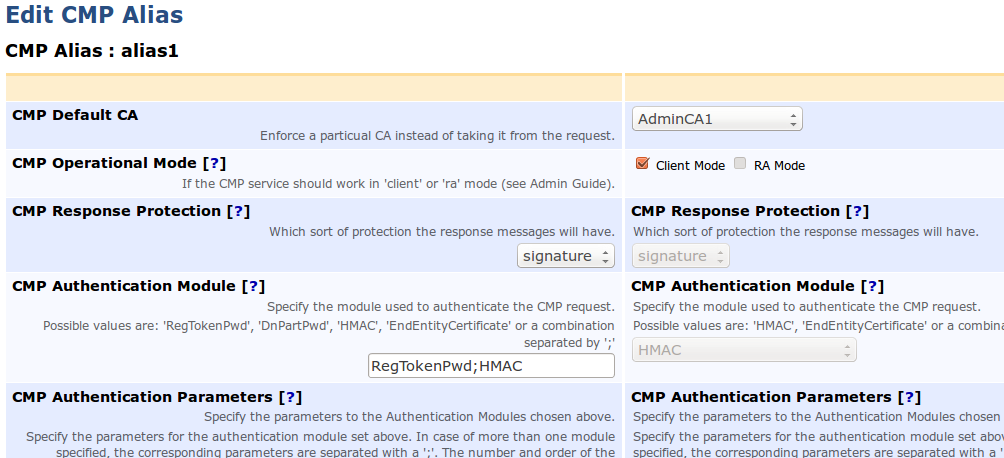
Introducing CMP aliases. With the arrival of EJBCA 6 you will be able to configure as many CMP URLs (CMP aliases) as you want, each one with a different configuration. There is a set of default (secure by default) options that each new alias configuration inherits and that you can override for each individual URL.

As an example, I set up this test environment for testing with cmpforopenssl.
  • Client mode with HMAC password authentication on server-address:8080/ejbca/publicweb/cmp
  • Client mode with client certificate authentication on server-address:8080/ejbca/publicweb/cmp/alias1
  • RA mode with fixed HMAC RA password 'password' on server-address:8080/ejbca/publicweb/cmp/alias2
Needless to say, alias1 and alias2 are just strings and you can use anything you like.

At first shot this was configured in a new configuration file, cmpaliasconf.properties.
cmp.alias1.operationmode=client
cmp.alias2.operationmode=ra
etc.

But heck, some people here were not satisfied with that, so lets configure everything in the Admin GUI instead.
You heard it, in EJBCA 6 you will configure CMP in the Admin GUI, and you can select and add new aliases simply by clicking some buttons.
Of course there will also be a command line interface (CLI) so you can script it or simply use the CLI if your administrator certificate has expired (but you don't let that happen do you?).

The new CMP configuration is stored in the database so there is a single configuration across your cluster, configure on one node, see the effects on all.
There will also be a possibility to read in an old configuration file in the CLI, so upgrades from the old style file configuration is easy.

All currently available CMP features, such as the CMP proxy is of course available just as before.

Needles to say, we think this new feature is awesome. Since I don't know much about other products I can't say it is unique, but it's a leap forward in usability for us.
With CMP being used more and more now (after all these years as an RFC) and replacing the simple SCEP protocol, this will ensure that EJBCA can work with many different CMP clients out there, all at the same time.

Part 3 of "What's new in EJBCA 6" will be about a completely new feature called Internal Key Bindings and OCSP Key Bindings. Anyone longing for an Admin GUI for EJBCA standalone OCSP responder?

Until then...check in with PrimeKey, or follow us on Twitter, for the latest news and events.